Reference pattern: Team Brain (opens in a new tab)
Skills, custom commands, and rules are wonderful… until you have forty of them and nobody remembers what any given one does. Over time a team accumulates helpers for Jira, code review, on-call debugging, tribal docs, MCP quirks - each useful on its own, collectively a catalogue nobody can keep in their head. The fix is not “make more slash commands.” Building scalable skills for agentic workflows means one entry point whose only job is to classify intent, announce that intent, and then load just enough context to run the matching subflow.
This post builds that classification layer from scratch, using a Team Brain skill as the running reference. We will wire a thin SKILL.md router, a forced technical-communication standard, a references/ folder for knowledge answers, and a second deliberately silly workflow (a structured calculator) so you can see progressive disclosure (opens in a new tab) and intent routing in action.
The sample lives in the new CodeSloth Cursor Samples (opens in a new tab) repo. Grab it from the Code Sloth Code Samples page under Cursor / AI tooling.
The problem with rules, commands, and skills
Cursor gives you several places to teach the agent how your team works: rules, commands, and skills. Rules are great for always-on guardrails. Commands are great for short, named actions. Skills shine when a workflow needs files, branching logic, and progressive disclosure - the agent only opens the markdown (and scripts) required for the path it chose.
The failure mode is scale, and each surface breaks in its own way.
Rules are especially tempting to overgrow. Every new “always remember this” instruction ends up in the agent’s context whether the current task needs it or not. Stack enough of them and you are not documenting your standards - you are bloating the context window with guidance that is irrelevant to half the prompts you send. That dilutes attention, burns tokens, and makes it harder for the model to notice the rules that do matter for this turn.
Commands and top-level skills fail in a more human way. If every capability is its own slash entry, you become the routing layer. You spend energy remembering /review-api vs /review-infra vs /oncall-kafka instead of stating what you need.
A team brain skill flips both problems: you talk to one entry point; the skill owns the routing table and loads only the context required for the path it chose.
Anatomy of scalable skills for agentic workflows
For this intro we keep the brain intentionally small:
- Intent classification in
SKILL.md- no Elasticsearch tutorials living in the router. reference-answer- load topic files underreferences/and answer with sources.structured-calculator- a naive arithmetic path with a rigid text envelope so demos look nothing like a knowledge answer.
Both paths must announce classification with an invariant prefix:
Intent identified: <intent-id>That line is the contract. It gives a human watching the agent clear confirmation that the right workflow was chosen, and confidence that the agent is doing the task you asked for - not quietly wandering into a different path. It also gives us an assertable outcome for evals, including future Harbor (opens in a new tab)-style runs that can check the announcement before judging the rest of the reply.
Project layout in Cursor
Open the team-brain-intro/ folder as a Cursor project (not necessarily the repo root). You should see a local .cursor/skills/team-brain-intro/ tree.
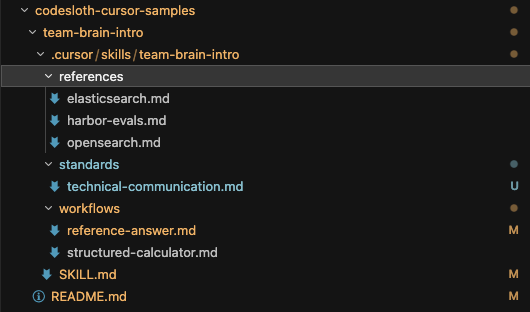
The important idea: a skill is allowed an arbitrary filesystem. Relative links from SKILL.md into standards/, workflows/, and references/ are how you mix forced shared context with progressive disclosure. Unrelated topic files stay closed until a workflow asks for them.
The skill: classification only
Here is the shape of the top-level skill. The full file is in the samples repo; the excerpts below are the parts that matter for the article.
Frontmatter and role
---
name: team-brain-intro
description: >-
  Team brain intro skill that classifies user intent and routes to a reference-based
  answer workflow or a structured calculator workflow. …
disable-model-invocation: true
---

# Team Brain Intro

Classify intent. Announce it. Load **only** the workflow (and references) that intent needs.

This top-level file has **no domain business logic**. It is the intent classification layer …
disable-model-invocation: true keeps the skill opt-in via /team-brain-intro so ambient chats do not accidentally swallow every question. The description still teaches discovery when you do want auto-routing in a later version.
Progressive disclosure rules
The skill tells the agent, in order: classify against workflow routing → announce → always load a small set of shared standards → read only that workflow → if the path needs knowledge, use reference routing to open only matching reference files.
That mix is the point of a top-level skill. Progressive disclosure keeps topic context small. Forced standards keep the few norms you never want skipped - without pasting them into every workflow, and without turning them into always-on Cursor rules that tax every chat in the repo.
Forced standard context
Progressive disclosure is not “load nothing until optional.” The router can also require files. This intro forces one:
| Standard | Why it is forced | Load |
|---|---|---|
| Technical language and communication | Keep replies concise for humans who overload on long agent output | standards/technical-communication.md |
That standard is inspired by ASD-STE100 (opens in a new tab) (Simplified Technical English): short sentences, one instruction per sentence, active voice, simple verb forms, less filler, answer first. It is a practical subset for chat - not a claim that the agent memorised the full STE dictionary.
Because the load is mandated from SKILL.md, both reference-answer and structured-calculator inherit it. Path-specific presentation (Sources section vs calculation envelope) still lives in each workflow. The shared standard only constrains how human-facing prose is written.
Keep the always-on list tiny. Every forced file spends context on every invocation. Put cross-cutting norms here; put optional domain facts in references/.
Two routing tables
The top-level skill keeps two tables on purpose.
Workflow routing decides which procedure to run:
| Intent id | Triggers | Load |
|-----------|----------|------|
| `reference-answer` | Questions about topics under `references/` … | workflows/reference-answer.md |
| `structured-calculator` | Arithmetic, evaluate expression, compute / calculate … | workflows/structured-calculator.md |
Reference routing is the catalogue of knowledge files this brain can open. The intro sample consults it from reference-answer, but any workflow may point at the same rows (or link a reference file directly) when it needs domain facts. Each row carries enough “include when…” detail for the agent to decide whether that file should join the context:
| Topic id | Include when the question is about… | Load |
|----------|--------------------------------------|------|
| `elasticsearch` | Elasticsearch; ES mappings; keyword vs text on Elastic; … | references/elasticsearch.md |
| `opensearch` | OpenSearch; `flat_object`; OS field types; … | references/opensearch.md |
| `harbor-evals` | Harbor; Terminal-Bench; agent / skill eval harnesses … | references/harbor-evals.md |
Overlap is intentional. A question about keyword behaviour on both engines can load elasticsearch and opensearch. A Harbor-only question should not drag search references into context.
The router also carries maintenance instructions: add workflows and workflow-routing rows for new procedures; add reference files and reference-routing rows for new knowledge topics; add only rare cross-cutting files under standards/ when every path must see them; keep the Intent identified: prefix stable.
The references folder
references/ is ordinary markdown sitting inside the skill’s folder tree. Skills are allowed that kind of filesystem - you are not stuck stuffing everything into one SKILL.md. Drop in as many topic files as you need: canonical links, short summaries, and tribal pointers that are not ready for a company wiki yet.
One hard rule: reference files must not contain presentation information. No answer templates, no “lead with this framing”, no output section order. Facts and links only. How the agent should present an answer lives in the workflow that uses those files.
Think of references as composable building blocks, not as property of a single “Q&A mode.” The reference-answer workflow is one consumer. A later on-call or code-review workflow can load the same Elasticsearch file mid-procedure when a step needs that context - without copying tribal knowledge into the workflow, and without turning the reference into a mini presentation guide. Workflows decide whether and when to load a reference; the reference stays reusable.
Our intro brain ships three topics:
| File | Role |
|---|---|
elasticsearch.md | Elastic docs + Code Sloth ES posts |
opensearch.md | OpenSearch docs + Code Sloth OS posts |
harbor-evals.md | Harbor / Terminal-Bench primary links |
Elasticsearch and OpenSearch intentionally overlap on “search” themes so reference routing has to pick the right tribal cache - keyword field docs on elastic.co vs docs.opensearch.org, plus the matching Code Sloth walkthroughs.
Elasticsearch reference (summary)
Thin summary up top (keyword vs text, aggregations, nested / flattened families), then tables of official Elastic mapping and aggregation docs, then links into posts such as the keyword field deep dive and the ES vs OpenSearch comparison.
OpenSearch reference (summary)
Same pattern on the OpenSearch side: official field-type and aggregation docs, plus the Java / Dashboards-oriented posts (keyword in Java, flat object, terms / composite / adjacency matrix tutorials, and so on). When someone asks about flat_object vs Elasticsearch flattened, loading both reference files is encouraged.
Harbor reference (summary)
Harbor is the eval / optimization framework that grew out of Terminal-Bench - containerized agent runs, modular tasks, local Docker through to cloud sandboxes. The reference points at Harbor docs (opens in a new tab), the Harbor repo (opens in a new tab), and Terminal-Bench 2.0 (opens in a new tab). There is no Code Sloth Harbor deep dive yet; the cache is honest about that.
The reference-answer workflow
This is the knowledge path’s presentation contract. After Intent identified: reference-answer, the workflow tells the agent to:
- Use reference routing to open only the matching fact files.
- Answer from those summaries first, then lean on the linked posts and official docs.
- Shape the reply a specific way - short direct answer, bullets for key facts, then a Sources list.
That last part is the outcome we want humans (and evals) to recognise as a reference answer: readable prose plus an explicit Sources section, not a wall of model improvisation and not a calculator-style envelope. Topic framing notes (how to talk about keyword vs text, or Harbor vs Terminal-Bench) also live in this workflow file, next to the answer shape - still out of the reference markdown.
If no reference routing row matches, the workflow stops honestly: say there is no artifact yet, list the topics the brain does cover, and refuse to pretend the answer came from the skill’s cache.
The calculator path (contrast track)
The calculator workflow forbids the reference-answer shape - and in this intro sample it never opens anything under references/. That is a choice of this workflow, not a law of references. After Intent identified: structured-calculator, presentation comes entirely from the workflow file: the agent must emit a fixed envelope inside a text code fence so chat markdown cannot collapse the lines (bare === markers next to list items get mangled otherwise):
=== STRUCTURED_CALCULATION ===
expression: (12 + 8) * 3
result: 60
steps:
  - 12 + 8 = 20
  - 20 * 3 = 60
=== END_STRUCTURED_CALCULATION ===
Side by side with a keyword-field answer you get the point: same skill entry, different announcement, different presentation owner. One path produces prose plus Sources. The other produces a rigid calculation block. Workflows own presentation. References (when a workflow asks for them) own facts.
Demo: reference answers
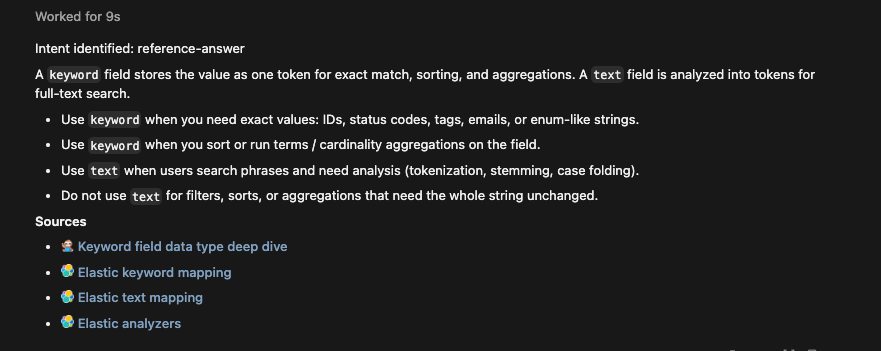
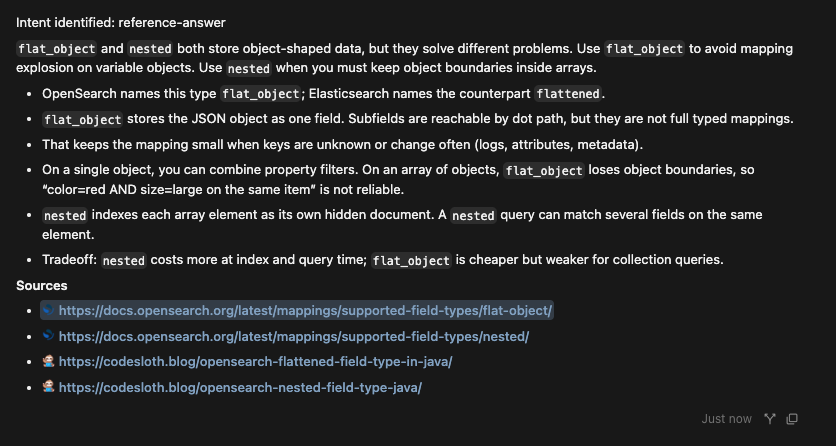
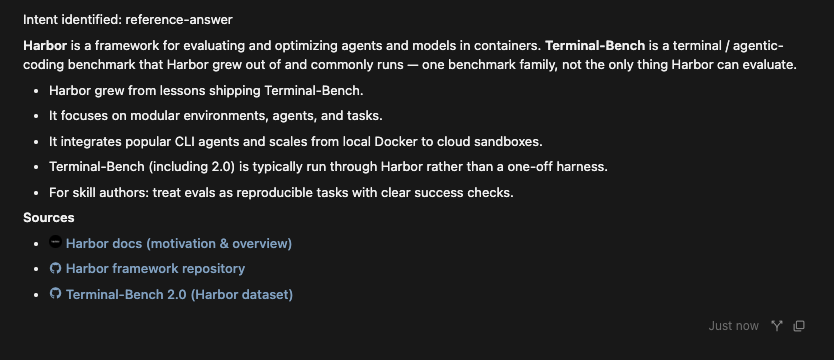
Invoke the skill and ask topic questions. Each reply should start with Intent identified: reference-answer, then cite the thin cache and linked posts/docs.
Elasticsearch
/team-brain-introWhat is an Elasticsearch keyword field, and when would I use it instead of text?
OpenSearch
/team-brain-introHow does OpenSearch flat_object relate to nested documents?
Harbor
/team-brain-introWhat is Harbor, and how does it relate to Terminal-Bench?
Demo: structured calculator
/team-brain-introCalculate (12 + 8) * 3
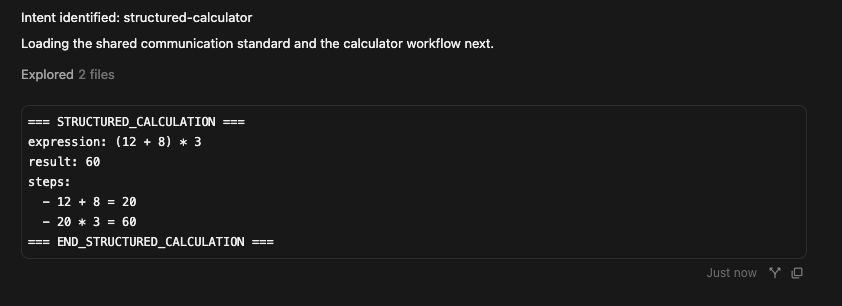
Same skill entry point. Different announcement. Different files loaded. Different output shape. That is the classification layer earning its keep.
Where this goes next
This article stops at the router plus two visibly different workflows. A real team brain can grow without turning SKILL.md into a junk drawer:
- Product MCP flows (Jira and friends) with documented limitations
- Code-review orchestration that fans out to review styles
- On-call assistants that classify alert categories, then run specialist subflows - eventually with DAG-style branching when earlier findings change the next step
- A general system-exploration fallback that says no artifact exists before it goes wandering
For the Code Sloth samples repo, later posts will ship their own starter folders rather than growing this intro sample into a maze - that is how we keep each article’s clone-and-try path simple, not a requirement of the skill itself.
Sloth Summary
- Accumulated rules, commands, and micro-skills create a human routing problem; a Team Brain-style skill owns the routing table instead.
- Keep
SKILL.mdas an intent classifier: announceIntent identified: …, force a tiny shared standard set, route workflows and references separately, then progressively disclose only what the path needs. standards/holds cross-cutting norms every path must load;references/is tribal + canonical facts (composable);workflows/owns procedures and path-specific presentation.- Ship a contrast path (here, a structured calculator) so classification and presentation contracts are obvious in demos and future evals.
- Clone the sample from Code Sloth Code Samples and open
team-brain-intro/as its own Cursor project.
Happy routing - may your context windows stay pleasantly underemployed. 🦥